How MyGarage talks to iOS
Visual Intelligence, Siri, Spotlight and Apple Intelligence: what each one is, and what MyGarage does with it.
MyGarage keeps a car's documents, receipts and history on the phone. On iPhone it also plugs into four system features, so you can reach that history without opening the app first: point the camera at a receipt, ask Siri, type in Spotlight, or read what Apple's on-device model noticed. Here is how each one works, and where the line is drawn.
Visual Intelligence
Point the camera at a receipt. The receipt you saved months ago comes back.
What it is
Visual Intelligence is the camera search built into iOS 26. Press the Camera Control, or the Action button, or the Control Centre tile, aim the iPhone at something and tap Search. iOS works out roughly what it is looking at, and asks the apps that support it what they know. Each app gets its own tab in the results sheet, next to Google.
Apple's part is deliberately small. An app receives one or two generic English words, such as receipt or car, together with the camera frame. It is never told the shop's name, the plate or the amount. What the app makes of the frame is up to the app.
How MyGarage uses it
The matching happens in three layers, fastest first:
- Apple's word picks where to look. Car searches your cars. Receipt or document searches your documents and expenses.
- Text recognition, on the device. In about half a second the frame is read for a number plate, a vendor name and a date, and those are compared with your records. A plate identifies a car even when the camera reads an O for a 0. A vendor together with a matching date identifies the exact receipt among all the others from the same station.
- A second reading by Gemini. At the same time the frame goes to Google's Gemini model, which returns just a few fields: what the paper is, the vendor, the date, the plate. They run through the same matcher. This is what copes with a crumpled or badly lit receipt the text recogniser cannot read.
The sheet then shows the matching receipt first, an Add this receipt to MyGarage tile that opens the expense form with the photo already attached, and your most recent receipts. Tap a result and the app opens on that document.
Only the camera frame is sent for the second reading. Nothing about your records leaves the phone, and MyGarage keeps nothing of the frame beyond the moment you tap Add.
Requires iOS 26 on an iPhone with Apple Intelligence.
13 seconds: point, search, the receipt found, the receipt opened.
Siri and App Shortcuts
“Hey Siri, log fuel in My Garage.”
What they are
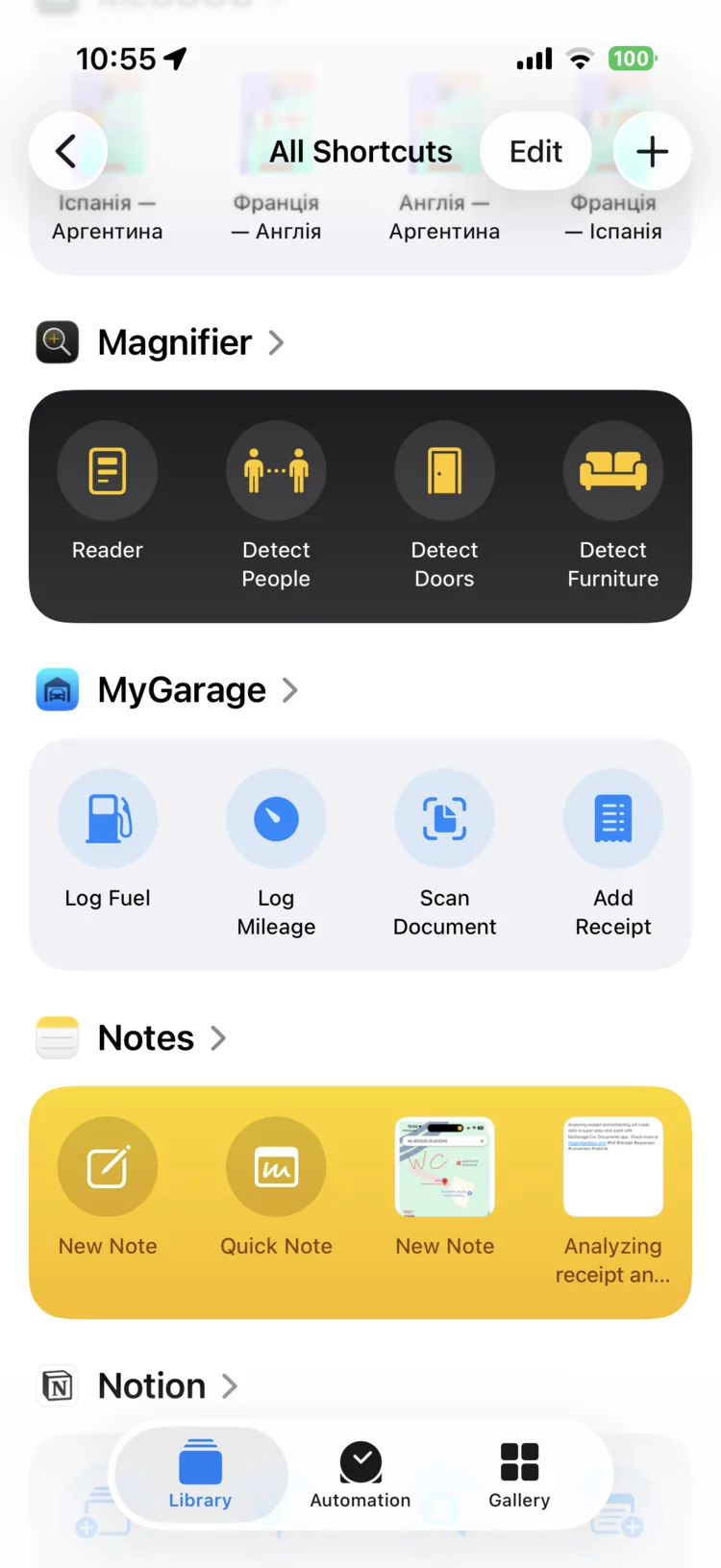
App Shortcuts are actions an app registers with iOS the moment it is installed. They show up in the Shortcuts app under the app's name, in Spotlight when you type the app's name, and Siri understands their phrases without you recording anything.
How MyGarage uses them
MyGarage registers four: Log Fuel, Log Mileage, Scan Document and Add Receipt. Each has three phrasings and is translated into all ten App Store languages, so “Tanken in My Garage eintragen” works as well as the English, and “Registra rifornimento in My Garage” too.
Say the phrase and the matching form opens, ready to type. Under the hood each phrase is an App Intent that hands one action to the app, the same route the Home Screen quick actions use. Siri, the Shortcuts app, the Action button and a long press on the icon all end on the same screen.
Siri also learns. When you log fuel by hand, the app tells iOS you just did that, which is what lets the suggestion appear on the Lock Screen the next time you are at a station.
Spotlight
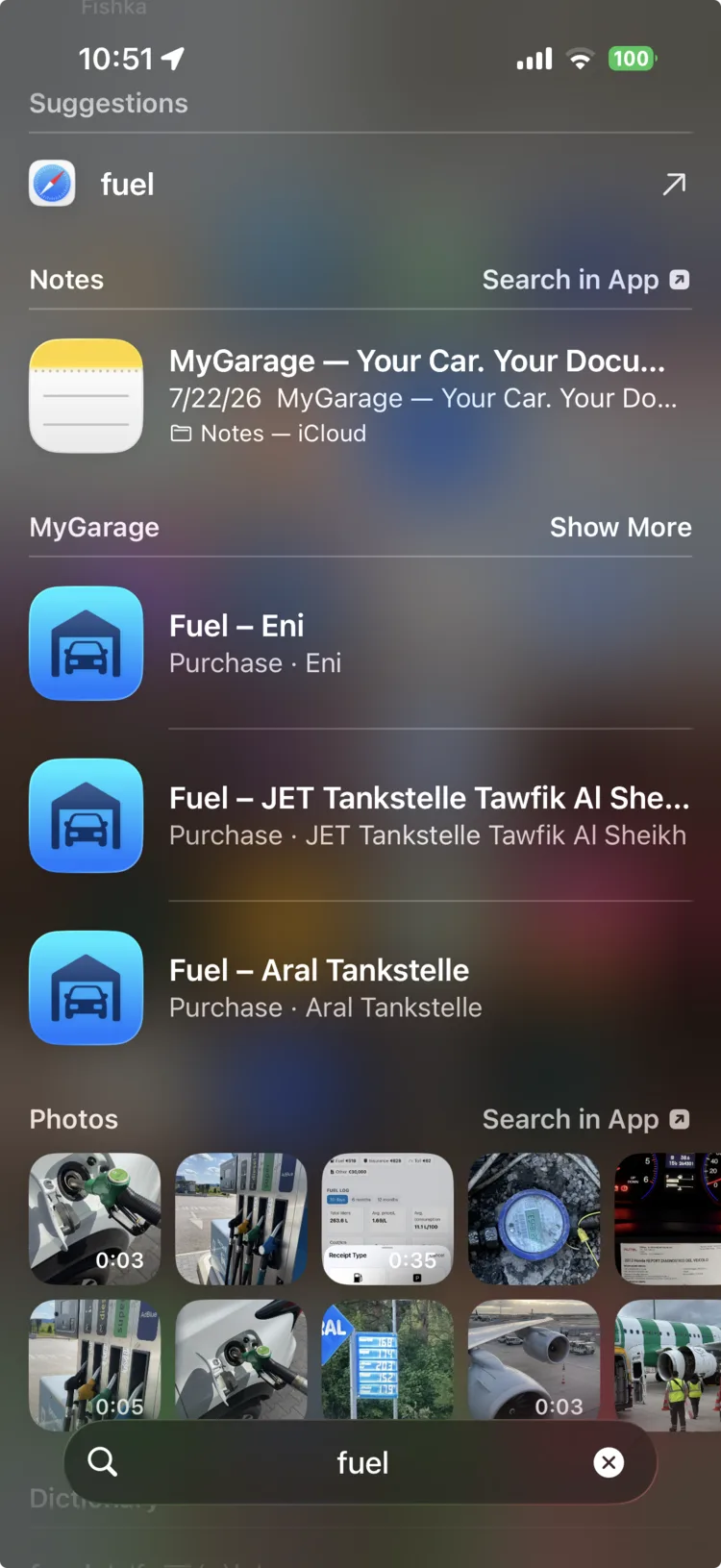
Type “fuel” on the Home Screen. Your fuel purchases are right there.
What it is
Spotlight is the search you get by swiping down on the Home Screen. Apps can contribute their own records to it, and iOS ranks them alongside Mail, Notes and Photos.
How MyGarage uses it
Every car, document and expense in MyGarage is indexed: fuel lists your fuel purchases, a vendor's name finds its receipts, a plate finds the car. Tapping a result opens exactly that item, switching to the right car first if you have several.
What goes into the index is deliberately thin: the title, the tags, the vendor and the date. Never the contents of a document, its image, the VIN or an amount. The index lives in Apple's on-device search database, is rebuilt within two seconds of any change, and can be switched off under Settings → Show in Spotlight.
Because the same entries are registered as app entities, Siri can search them too: “find my registration in My Garage” opens the app on the results. On Android the same index goes into AppSearch, so device search on a Pixel finds the same records.
Apple Intelligence
The everyday reading happens on the phone.
What it is
Apple Intelligence includes a language model that runs on the iPhone itself. Apps can use it for short reasoning tasks without sending anything to a server. It is small, so it is quick and private, and limited, so it is not the right tool for everything.
How MyGarage uses it
On iPhones that support it, MyGarage runs the on-device model for the everyday work: what type a scanned document is, which tags fit, a title, a short summary. Nothing leaves the phone, and it works without a connection.
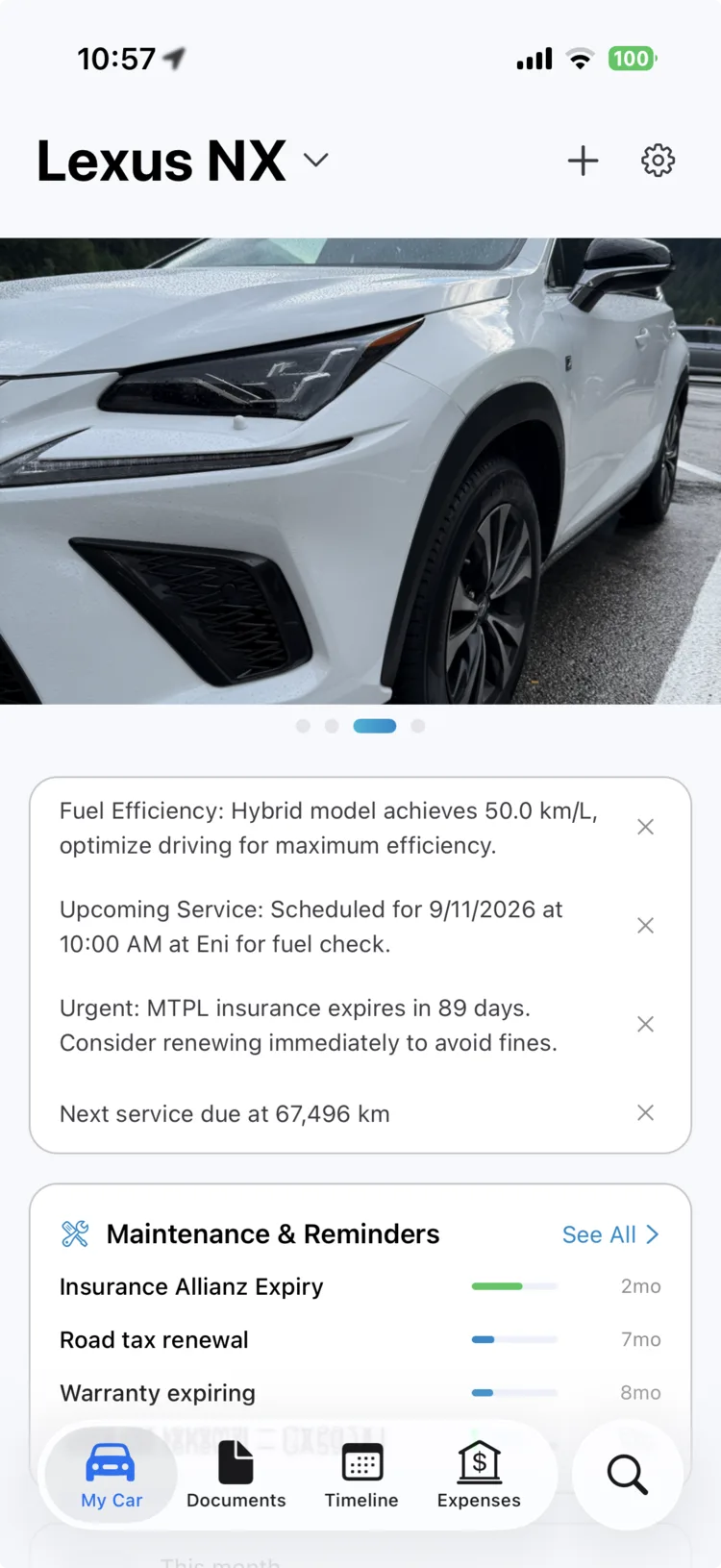
The clearest place you see it is the insights card on My Car: three short observations written from your own records, such as an insurance that expires soon, the next service that is due, and how the car's consumption looks. They are generated on the device and refresh as the records change.
Deeper work, such as pulling every line item out of a multi-page workshop invoice, still goes to Gemini. That split, and exactly which data goes where, is described on the AI and privacy page.
What you need
| Siri, App Shortcuts, Spotlight | iOS 18 or later. Android 12 or later for device search. |
|---|---|
| Visual Intelligence | iOS 26 on an iPhone with Apple Intelligence. |
| On-device insights | An iPhone with Apple Intelligence. Elsewhere the insights come from Gemini instead. |
| An account | None. There is nothing to sign up for. |